> ## Documentation Index
> Fetch the complete documentation index at: https://firespark.cloud/docs/llms.txt
> Use this file to discover all available pages before exploring further.
# Overview
> Sell on every channel from one place — menus, orders, and intelligence unified across your operation.
 ## One platform for every sales channel
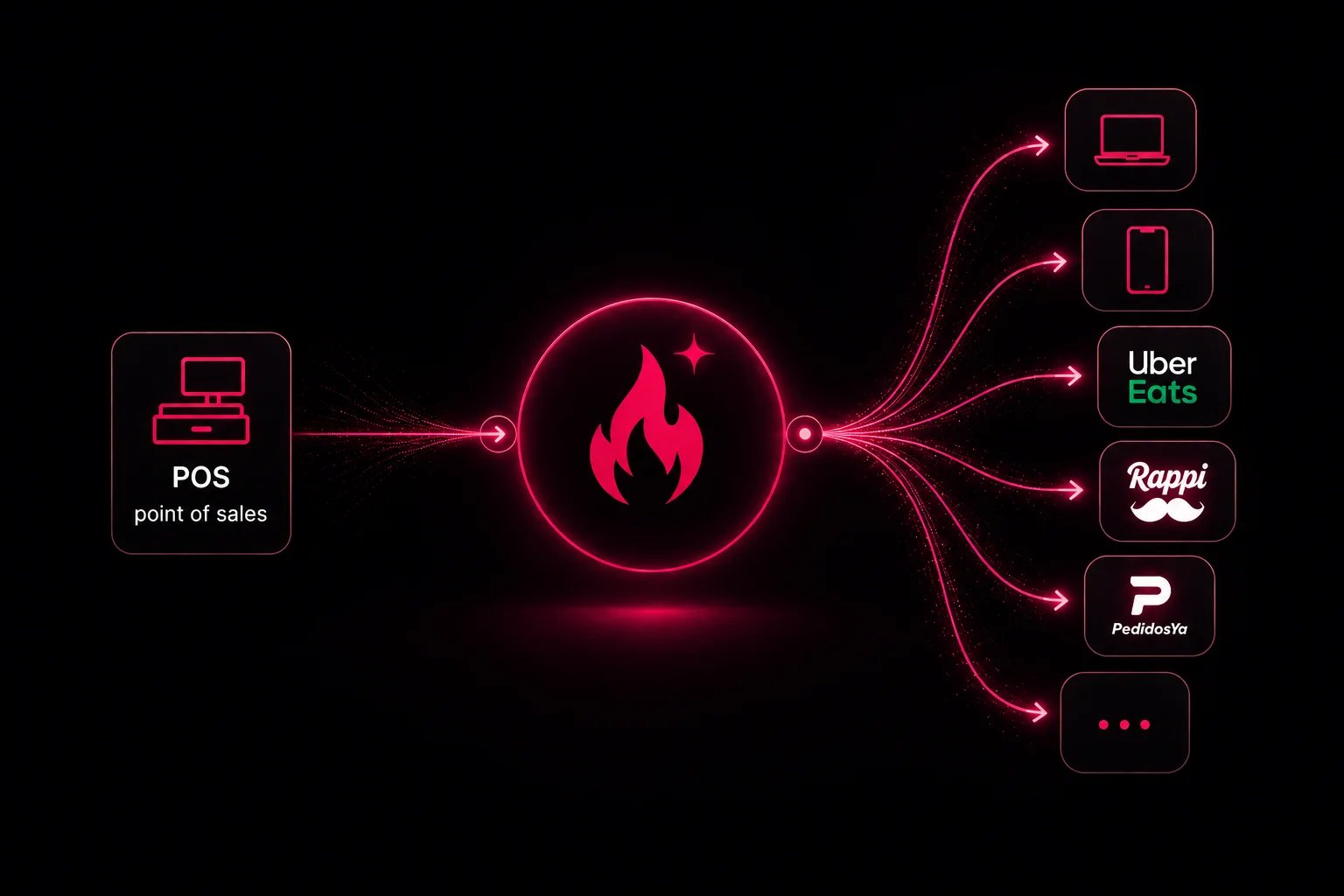
Fire spark is the **omnichannel layer** between your operation and every place customers order. Your POS and RMS stay the source of truth for menus, pricing, and fulfillment. Fire spark syncs that data outward, applies **cross-channel intelligence**, and routes orders back into the systems your team already runs.
For marketing and commercial teams, that means fewer disconnected tools, faster launches, and a consistent brand experience whether the customer orders on your app, your website, a kiosk, or an aggregator.
## What you can achieve
| Goal | How Fire spark helps |
| -------------------- | ---------------------------------------------------------------------------------------------------------- |
| Expand reach | Operate owned channels and aggregators from the same merchant setup |
| Protect the brand | Operational truth from the POS; composed menus per channel so surfaces stay accurate without manual copies |
| Move faster | Turn on a new channel without rebuilding menus and operations from scratch |
| See the full picture | Orders and performance across channels in a single operational view |
| Optimize with data | Test menus, monitor live operations, and compare channels without siloed reports |
You do not need a separate integration strategy per aggregator or per owned channel. Connect your operation once; Fire spark handles the rest.
## Channels you can operate
Fire spark supports **owned channels** you control end to end and **aggregators** where customers already discover your brand.
| Type | Examples |
| ----------- | ----------------------------------------------------- |
| Owned | Mobile app, web ordering, in-store kiosk, call center |
| Aggregators | Uber Eats, Rappi, PedidosYa, DoorDash |
Browse supported POS, RMS, and sales channels
How channels fit into your merchant setup
## Omnichannel value
Most merchants today stitch together one integration per aggregator plus separate stacks for app, web, and in-store ordering. Each path has its own menu copy, its own sync delays, and its own reporting. When pricing or availability changes in the POS, teams chase updates channel by channel.
Fire spark replaces that fragmentation with a **single hub**:
1. **One operational source** — Your POS or RMS remains master data; price changes and 86s flow from there.
2. **Composed menus** — Show the right catalog per channel, store, fulfillment mode, or schedule — same platform, not the same SKU list everywhere.
3. **One order path** — Orders from any surface flow into the same operational stack.
Stores, brands, fulfillment options, and channel rules still live in one merchant configuration. Commercial teams get both **consistency where it matters** and **differentiation where strategy requires it**.
The result is fewer integration projects, less menu drift, and launches that do not force a choice between “one menu everywhere” and “a spreadsheet per partner.”
## Intelligence layer
Omnichannel sync is the foundation. **Intelligence** is what lets you run different commercial plays per surface without rebuilding integrations.
Fire spark applies that intelligence on top of synced operational data:
* **Menu composition** — Different menus by channel, store, fulfillment type, or schedule while items and pricing still originate in the POS.
* **Channel-aware rules** — Logic per surface (aggregator vs owned app vs kiosk) from one configuration layer.
* **Menu experimentation** — Test titles, images, or item placement and measure impact before rolling out broadly.
* **Consolidated analytics** — Compare volume, mix, and performance across channels instead of exporting spreadsheets from each platform.
* **Real-time visibility** — Monitor orders and operational signals as they happen across the network.
Intelligence turns “we are on five channels” into “we know what works on each channel and can act on it.”
Plan reach and consistency across surfaces
Optimize what customers see per channel
One view of performance across channels
Track live operations across the network
## What you can build
Beyond listing on aggregators, Fire spark lets you **own the customer relationship** on the channels that matter to your brand.
| Initiative | Outcome |
| ------------------- | -------------------------------------------------------------------------------------------------- |
| Branded mobile app | Loyalty, reorder, push, and saved preferences on your terms |
| Web ordering | A direct ordering site with your look, delivery, and pickup flows |
| In-store kiosk | Self-service ordering with a menu tuned for the venue |
| Call center | Phone orders with the catalog and fulfillment rules for that context |
| Aggregator presence | Marketplace listings synced from your operation, with channel-specific assortment when you need it |
Each initiative pulls from the same operational data. You decide whether a surface shares the full menu or a composed variant — a promo, a new item, or a store closure still propagates from the POS without a separate project per channel.
## How it fits your stack
```
POS / RMS → Fire spark → Sales channels
(source of (sync, (app, web, kiosk,
truth) intelligence, Uber Eats, Rappi,
routing) PedidosYa, …)
```
Your kitchen and back office keep working in the systems they know. Fire spark sits in the middle so commercial and marketing teams can grow channels without re-architecting operations.
## For technical teams
Product and engineering teams implement against three APIs, each scoped to a different actor:
| API | Who uses it |
| -------------------------------------------------- | ---------------------------------------------- |
| [Storefront API](/docs/storefront-api/introduction) | Customer-facing app, web, and kiosk |
| [Integrations API](/docs/integrations-api/introduction) | POS and RMS partners |
| [Admin API](/docs/admin-api/introduction) | Merchant back-office, bulk data, and migration |
First steps in the platform
Brands, stores, menus, orders, and fulfillment
How Fire spark compares to other approaches
Set up a merchant before going live
## One platform for every sales channel
Fire spark is the **omnichannel layer** between your operation and every place customers order. Your POS and RMS stay the source of truth for menus, pricing, and fulfillment. Fire spark syncs that data outward, applies **cross-channel intelligence**, and routes orders back into the systems your team already runs.
For marketing and commercial teams, that means fewer disconnected tools, faster launches, and a consistent brand experience whether the customer orders on your app, your website, a kiosk, or an aggregator.
## What you can achieve
| Goal | How Fire spark helps |
| -------------------- | ---------------------------------------------------------------------------------------------------------- |
| Expand reach | Operate owned channels and aggregators from the same merchant setup |
| Protect the brand | Operational truth from the POS; composed menus per channel so surfaces stay accurate without manual copies |
| Move faster | Turn on a new channel without rebuilding menus and operations from scratch |
| See the full picture | Orders and performance across channels in a single operational view |
| Optimize with data | Test menus, monitor live operations, and compare channels without siloed reports |
You do not need a separate integration strategy per aggregator or per owned channel. Connect your operation once; Fire spark handles the rest.
## Channels you can operate
Fire spark supports **owned channels** you control end to end and **aggregators** where customers already discover your brand.
| Type | Examples |
| ----------- | ----------------------------------------------------- |
| Owned | Mobile app, web ordering, in-store kiosk, call center |
| Aggregators | Uber Eats, Rappi, PedidosYa, DoorDash |
Browse supported POS, RMS, and sales channels
How channels fit into your merchant setup
## Omnichannel value
Most merchants today stitch together one integration per aggregator plus separate stacks for app, web, and in-store ordering. Each path has its own menu copy, its own sync delays, and its own reporting. When pricing or availability changes in the POS, teams chase updates channel by channel.
Fire spark replaces that fragmentation with a **single hub**:
1. **One operational source** — Your POS or RMS remains master data; price changes and 86s flow from there.
2. **Composed menus** — Show the right catalog per channel, store, fulfillment mode, or schedule — same platform, not the same SKU list everywhere.
3. **One order path** — Orders from any surface flow into the same operational stack.
Stores, brands, fulfillment options, and channel rules still live in one merchant configuration. Commercial teams get both **consistency where it matters** and **differentiation where strategy requires it**.
The result is fewer integration projects, less menu drift, and launches that do not force a choice between “one menu everywhere” and “a spreadsheet per partner.”
## Intelligence layer
Omnichannel sync is the foundation. **Intelligence** is what lets you run different commercial plays per surface without rebuilding integrations.
Fire spark applies that intelligence on top of synced operational data:
* **Menu composition** — Different menus by channel, store, fulfillment type, or schedule while items and pricing still originate in the POS.
* **Channel-aware rules** — Logic per surface (aggregator vs owned app vs kiosk) from one configuration layer.
* **Menu experimentation** — Test titles, images, or item placement and measure impact before rolling out broadly.
* **Consolidated analytics** — Compare volume, mix, and performance across channels instead of exporting spreadsheets from each platform.
* **Real-time visibility** — Monitor orders and operational signals as they happen across the network.
Intelligence turns “we are on five channels” into “we know what works on each channel and can act on it.”
Plan reach and consistency across surfaces
Optimize what customers see per channel
One view of performance across channels
Track live operations across the network
## What you can build
Beyond listing on aggregators, Fire spark lets you **own the customer relationship** on the channels that matter to your brand.
| Initiative | Outcome |
| ------------------- | -------------------------------------------------------------------------------------------------- |
| Branded mobile app | Loyalty, reorder, push, and saved preferences on your terms |
| Web ordering | A direct ordering site with your look, delivery, and pickup flows |
| In-store kiosk | Self-service ordering with a menu tuned for the venue |
| Call center | Phone orders with the catalog and fulfillment rules for that context |
| Aggregator presence | Marketplace listings synced from your operation, with channel-specific assortment when you need it |
Each initiative pulls from the same operational data. You decide whether a surface shares the full menu or a composed variant — a promo, a new item, or a store closure still propagates from the POS without a separate project per channel.
## How it fits your stack
```
POS / RMS → Fire spark → Sales channels
(source of (sync, (app, web, kiosk,
truth) intelligence, Uber Eats, Rappi,
routing) PedidosYa, …)
```
Your kitchen and back office keep working in the systems they know. Fire spark sits in the middle so commercial and marketing teams can grow channels without re-architecting operations.
## For technical teams
Product and engineering teams implement against three APIs, each scoped to a different actor:
| API | Who uses it |
| -------------------------------------------------- | ---------------------------------------------- |
| [Storefront API](/docs/storefront-api/introduction) | Customer-facing app, web, and kiosk |
| [Integrations API](/docs/integrations-api/introduction) | POS and RMS partners |
| [Admin API](/docs/admin-api/introduction) | Merchant back-office, bulk data, and migration |
First steps in the platform
Brands, stores, menus, orders, and fulfillment
How Fire spark compares to other approaches
Set up a merchant before going live